A practical guide to Android habit apps
Choosing an Androidhabit app that fitsyour day.
Compare reminders, recording effort, and ways to review your habits. Check pricing and data storage too. This guide explains Peckot’s features and requirements from the developer’s perspective to help you decide whether it fits your day.

Choose an app around where you get stuck.
Before comparing feature lists, identify one thing that gets in your way. Look for support you can actually use in daily life.
- You forget
- Create a cue to start
- Logging feels like work
- Make recording easier
- Progress is hard to see
- Use records to adjust
Check whether Peckot fits your needs
Peckot suits people who want time or place reminders, simple recording, and a way to reflect on their daily rhythm. Check these conditions before getting started.
- Pricing and ads
- Core features are free. Ads appear in parts of the app. Take this into account if an ad-free experience is a priority.
- Registration and storage
- No account registration is needed. Habit data and records are stored on your phone. You can export a backup file, keep a copy, and import it to restore your data when needed.
- Compatible devices
- You need a phone running Android 13 or later. A watch is optional. Connect a compatible Wear OS watch if you want to record from your wrist.
- Reminder requirements
- Notifications need the relevant device permissions and settings. Place reminders also need location settings, and arrival detection can take a few minutes.
- Manual recording and adjustments
- The app does not automatically detect completed actions or optimize your schedule. Use the records to spot patterns and adjust your plans yourself.
You meant to do it. Then you forgot.
You planned to read tonight, but suddenly it is bedtime. Even with the intention to act, you can miss the moment in a busy day.
Decide when or where you will start.
Connect the action to a cue: open a book in the evening, or stretch when you get home. For a fixed schedule, look for time reminders. When your arrival time varies, consider whether a location reminder would fit better.
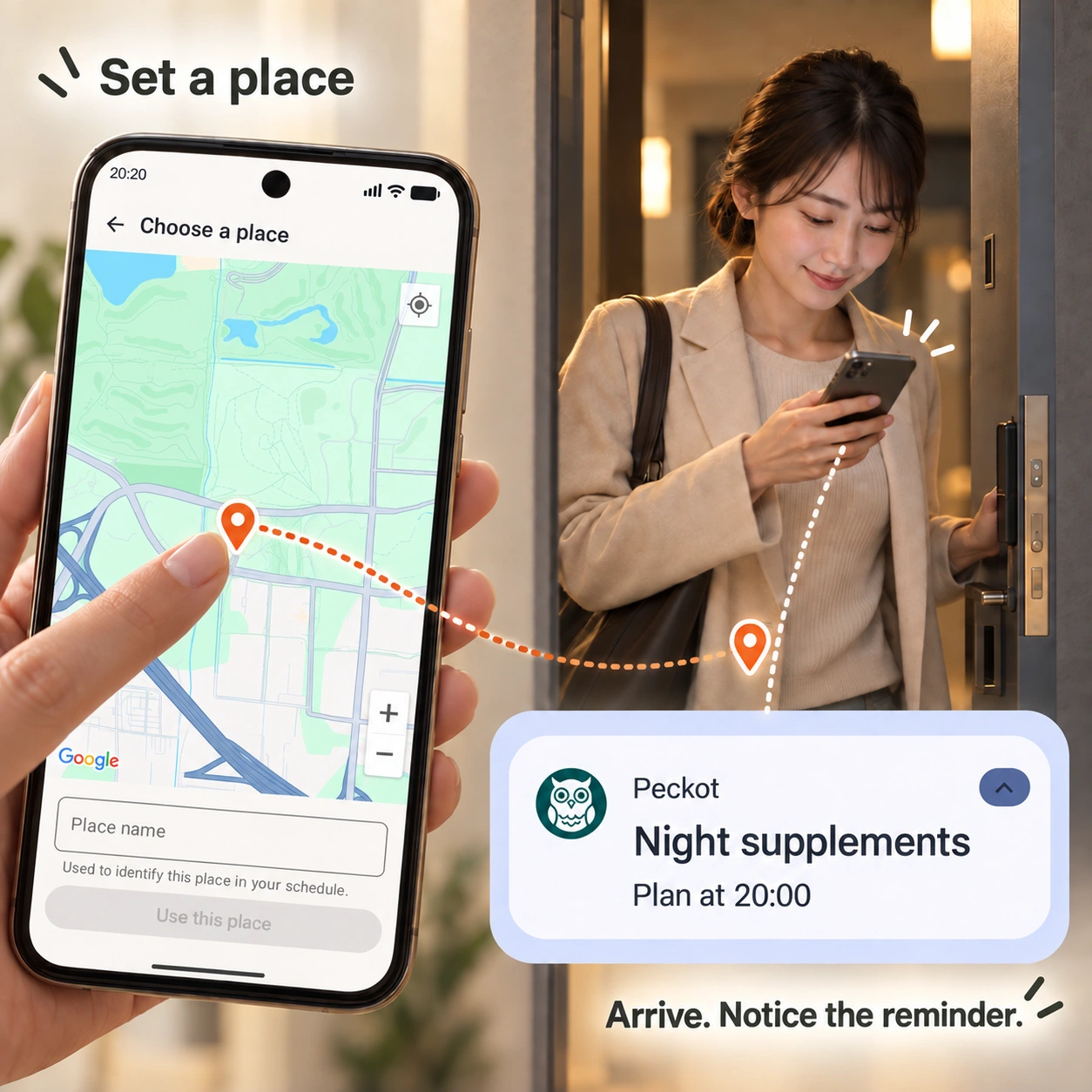
With Peckot, a time or a place can be your cue.
Create a weekday-and-time plan and set a reminder. For a place-based cue, choose a point on the map. When arrival is detected, the action becomes a plan for today, and a notification can remind you to start.
Location reminders need location access, notifications, and the relevant settings. Arrival detection can take a few minutes.
Set up location remindersYou did the habit. Logging it feels like another task.
After a walk, filling in several fields can feel like extra work. On a busy day, recording it might be the part you put off.
Keep everyday recording to a few simple actions.
Start with whether you did the action. Consider whether you really need a long note every time, and choose an app you can use within your normal routine.
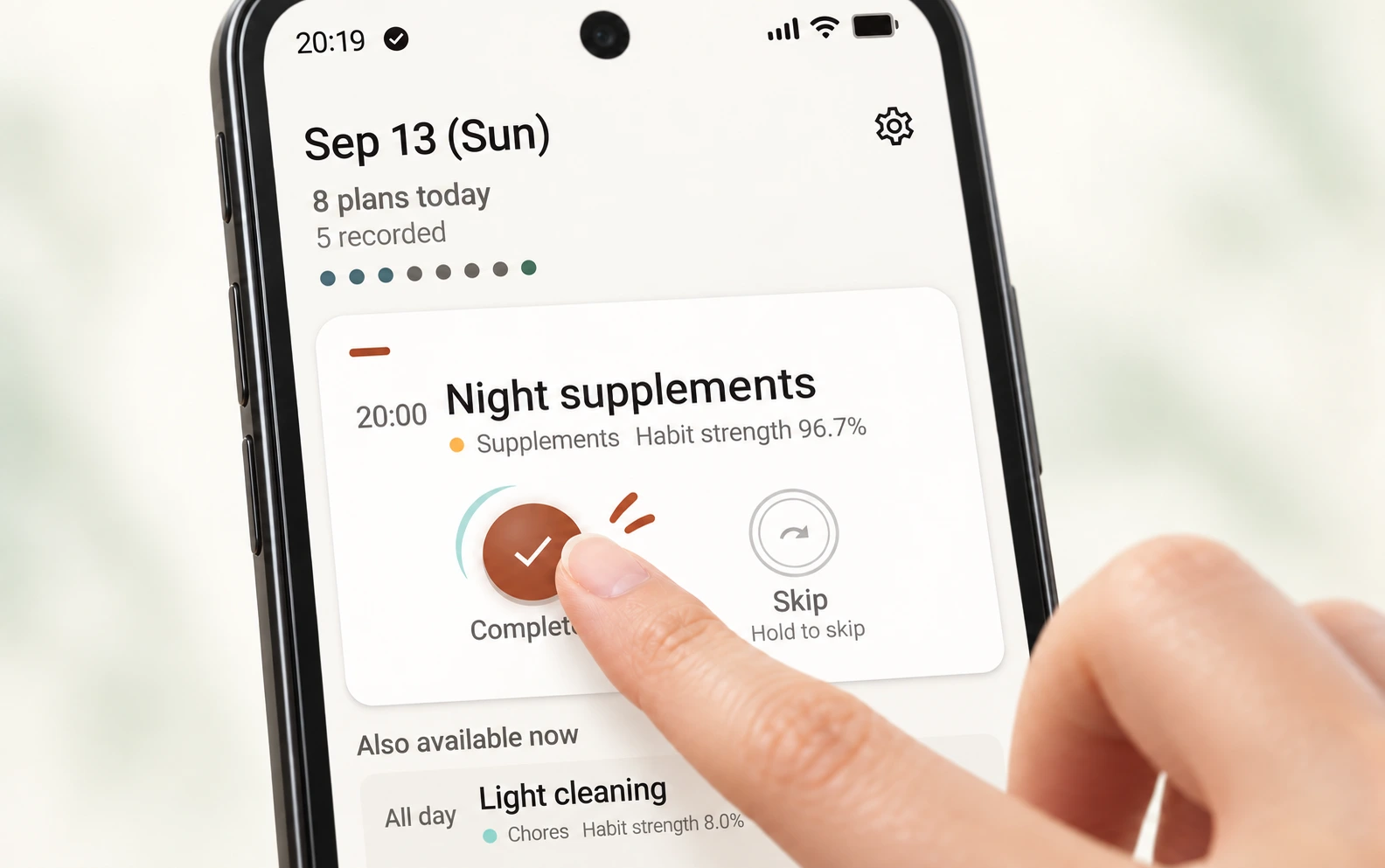
With Peckot, tap Complete when you are done.
Record completion from today's plans, or hold Skip when you cannot do it. If you have a compatible Wear OS watch, you can also record completion or skip from your wrist, without taking out your phone.
Record from your watchThe records add up. What has actually changed?
A completion count tells you how often you did something. By itself, it does not tell you whether the planned time fits your day or how established the habit is becoming.
Look at when you recorded it, as well as how often.
Does the planned time fit your day, or do you tend to log the action later? Look at several days of records alongside what you remember about your routine before deciding.
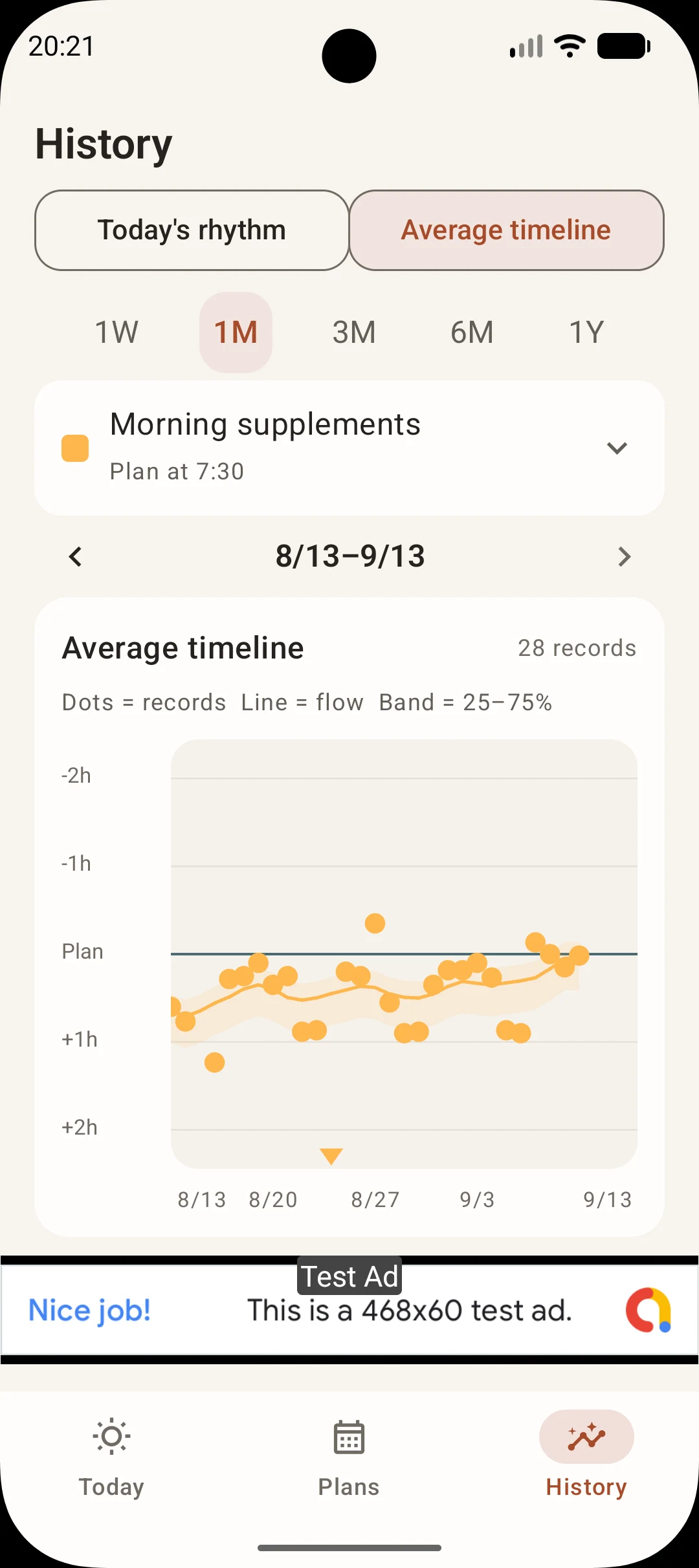
Read a month of records in the app
This Average timeline shows Morning supplements, planned for 7:30. There are 28 records from August 13 to September 13. It is a different habit from the evening walk below, used here to explain how to read the screen.
Use the records to consider your plan
Compare the dots with the Plan line
Most dots sit below the horizontal line marked Plan. This means completion was recorded after the planned time on many days.
Recall when you acted and when you logged it
If you logged the action later, the recorded time is different from the time you did it. The chart alone cannot tell you that your plan needs to change. Think back to when you acted and when you recorded it.
Decide whether your own habit needs a different time
For a habit such as reading or walking, if you also tend to do it at a different time from the plan, you could try a time that fits your day. To make a change, edit the habit in Plans. Keep recording afterward to see how it works for you.
The dots show when completion was recorded, not automatically measured start or finish times.
Read your timing patternsAn evening walk, from plan to record
Follow the Evening walk example shown in the actual app screen, from setting a plan to reviewing a record.
Choose a manageable action
Start with something achievable, such as a short walk. Give your plan a name like Evening walk in Peckot.
Set the days, time, and reminder
Choose weekdays and a time that suit your day, then set a reminder. The example shown here is planned for 17:00.
Record your walk
Tap Complete on the Today screen after walking. Hold Skip when you cannot do it. A compatible Wear OS watch also lets you record from your wrist.
Compare planned and recorded times
In Today's rhythm below, the 17:00 plan was recorded at 17:13. One day alone is not a reason to change your plan. Once more records build up, use Average timeline to check patterns and adjust the plan yourself.
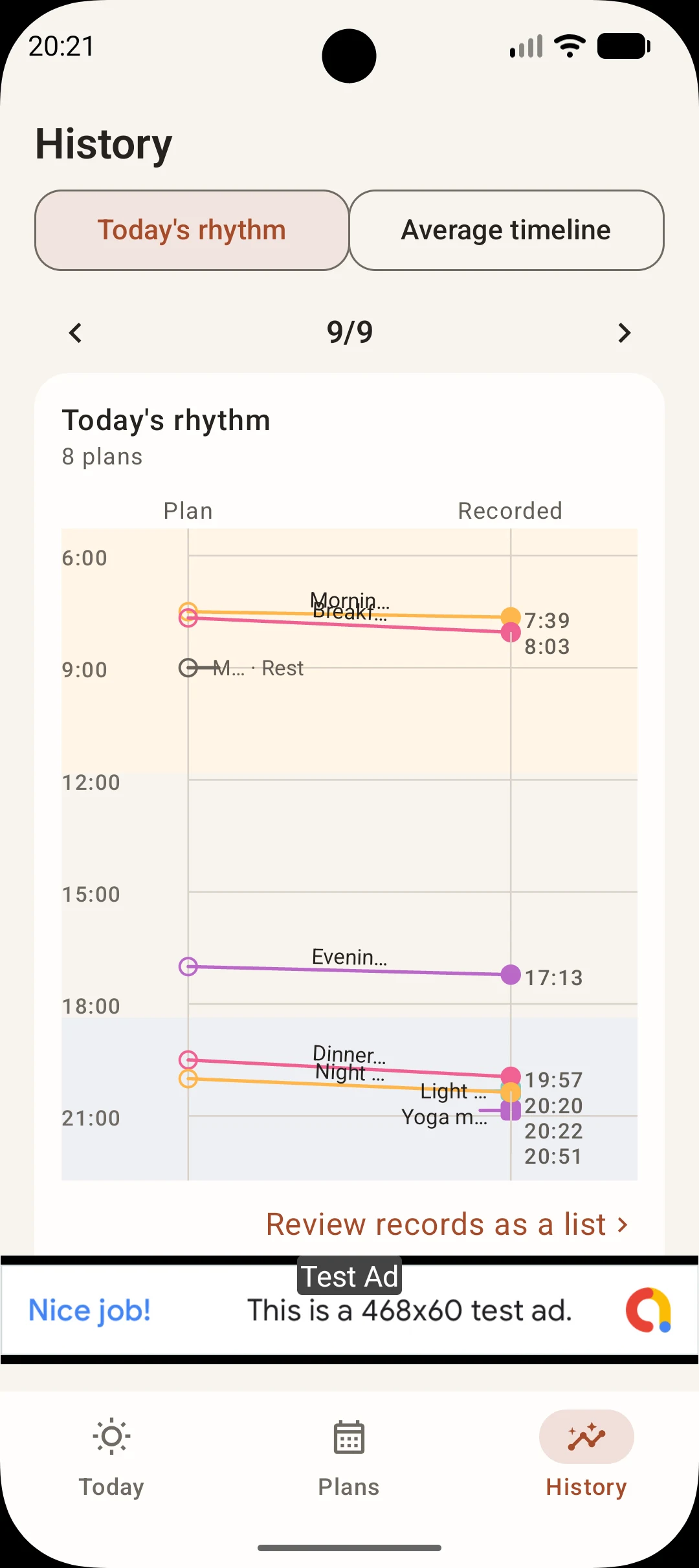
This screen illustrates how to use and read the app. Recorded times are not automatically detected walk start or finish times, and this is not evidence of habit-building results. The feature sections above also show other habits.
Before you start
How can I remember something on specific days and at a set time?
Set the weekdays and time for an action, then enable a reminder. For example, plan to read on weekday evenings. Your device must also allow notifications and have the relevant settings enabled.
Can I record a habit without filling in details every time?
Tap Complete on today's plan to record it, or hold Skip when you cannot do it. With a compatible Wear OS watch, you can also record from your wrist.
Can I review the days I completed a habit and the days I skipped?
The monthly records for each habit let you review completed and skipped days. You can also check the completion percentage and an indicator of how established the habit is becoming, alongside your records over time.
Do I need to create an account?
No registration is needed. Your habit data and records are stored on your phone.
Can I back up my records?
You can export a file from Data backup in Settings. Import the saved file to restore your habits and records. This also lets you keep a copy before changing phones or uninstalling.
Will installing an app make my habit stick?
Installing an app alone does not build a habit. Peckot provides cues, simple recording, and information to reflect on. Try actions and plans that fit your day, then use your records to adjust how you continue.
Do I need a watch or location setup to start?
No. You can start on an Android phone with weekday-and-time plans and recording. Use location reminders or Wear OS support when you need them.
Does a Habit strength of 90 mean my habit is established?
Peckot uses 90 as a guideline for an established habit, but it is not a guarantee about an individual's habit formation. Treat the 0–100 score as a reference alongside your records and your own experience.
 Peckot.
Give one habita place in Peckot.
Create a cue, record what you do, and use what you notice to take the next step. Try Peckot to find a way of continuing that fits your life.
Get Peckot on Google PlayAndroid / Wear OS support · Free, with ads
Explore all Peckot features