 Peckot.
REVIEW YOUR HABIT SCHEDULE
When your planned timedoesn't fit your day.
You plan to read in the evening, but keep missing the time you chose. Your records can help you reconsider whether that time fits your day. Peckot lets you compare planned times with when you recorded completion in a view called Average timeline. Use it to look for a time that might work better for you.
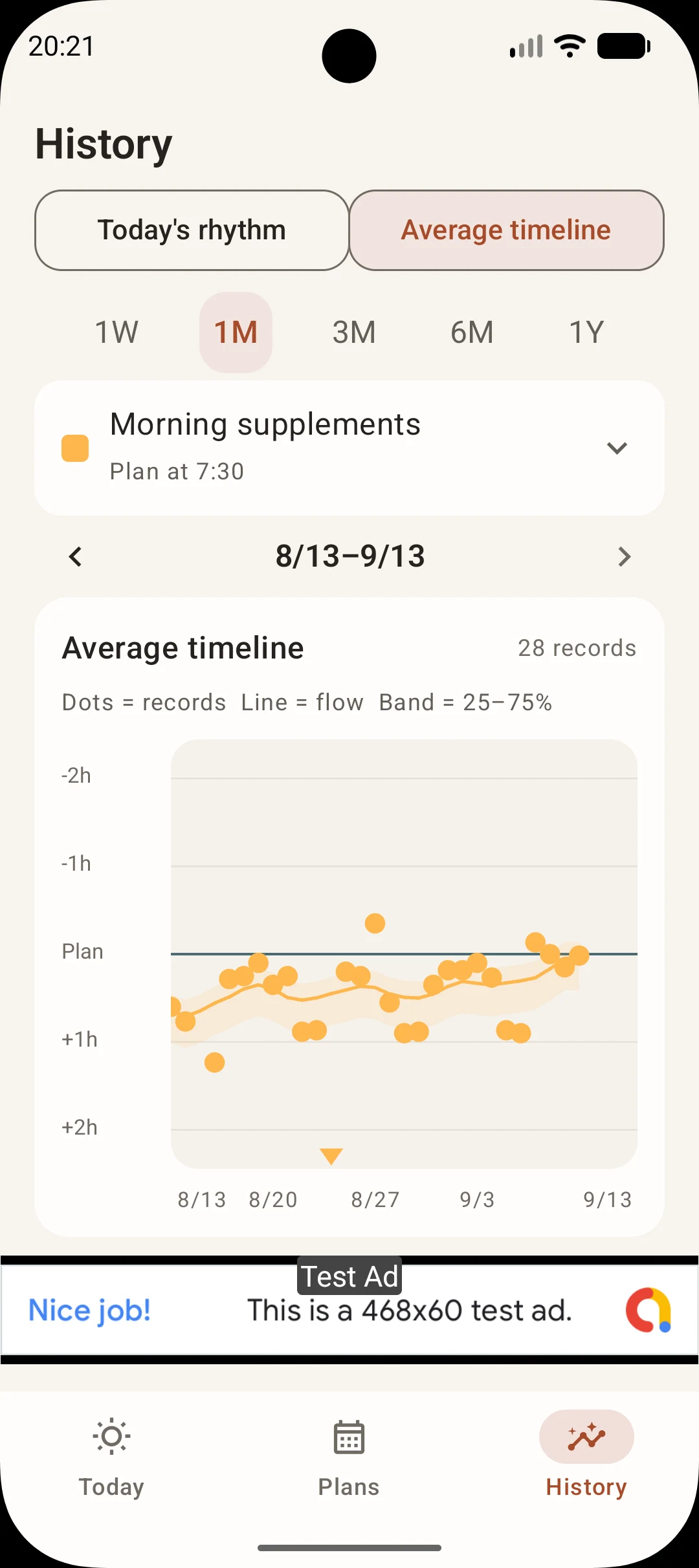
Choose a habit and a period
Open History
Choose Average timeline, then use the habit selector to choose the habit you want to review.
Start with one month
Choose one week, one month, three months, six months or one year. Use the arrows to move between periods. Start with a month to look at the pattern of dots, then expand the period if useful.
Read the dots, line and band
Dots represent records
The one-week and one-month views show individual records. The three-month, six-month and one-year views can also group records into dots. One dot does not always mean one record.
The line shows the trend
It helps you see how recorded times change. It is not a prediction. The one-week view has no trend line; limited records or gaps can also affect how the line appears.
The band shows variation
The 25–75% band is a guide to the spread of the middle 50% of records. A record outside the band does not mean an error or a failure.
Compare with the planned time
The reference line in this example is the planned time. Above it means earlier; below it means later. Read the dates along the horizontal axis to see when the difference changed.
Place-based habits use arrival as the reference, while all-day habits use clock time. Records more than two hours away from the plan or arrival may be represented by out-of-range triangles.
Use the pattern to review your plan
If dots tend to fall after the planned time, consider whether that later time fits your day better. If early and late records are mixed, reflect on those days without assuming there is a single cause.
To make a change, edit the habit in Plans on your phone. Peckot does not automatically reschedule it. Keep recording after the change and see whether the new timing works for you.
Common questions
What should I review if I keep missing my planned habit time?
Compare your planned times with when you recorded completion, and look for days or times when records tend to be later. If you logged an activity afterward, the record may not reflect when you did it, so consider what happened that day too. To change the plan, edit it yourself in Plans.
Will Peckot automatically choose a better time for me?
No. Peckot shows patterns in your recorded times. It does not identify an optimal time or automatically reschedule your habits. Use the view to consider a time that might fit your life better.
Why is there no line or band?
The one-week view has no trend line. In other periods, record counts, their distribution, gaps and schedule changes can affect the display. Choose a habit and period with completed records whose times are available.
Are skips included in the timing trend?
The trend is based on completed records with usable timing information. Skips and timeouts are not treated as completion times. Older records or records with unknown times may be shown as reference information.
Does being outside the band mean failure?
No. The band is a guide to variation in timing. It does not judge a day or determine the right way to keep a habit.
Related guides
Explore a time that works for you.
Start with one plan and record what you do. As your records build up, look for your own patterns.
View Peckot on Google PlayFree, with ads / Android and Wear OS
About Peckot →